
Trip budgets
Split travel expenses and see what’s left in your own budget
Your friend paid for dinner. You paid for the taxi. How much of your own budget is actually left? Use HowMuchie to record your share of shared costs alongside your own purchases.
The short answer
To track your own budget on a group trip, record the full bill, who paid and each person’s share separately. Count your share toward your personal spending, even when somebody else paid. Keep repayments separate from the cost of the meal, room or activity.
Track your share and what remains for your next meal, ride or activity.
The full bill, your share and who paid are different numbers
You cover a taxi. A friend covers dinner. Looking only at what left your wallet gives you an incomplete picture of your holiday spending. Keep the full bill, the payer and your own share separate so your budget reflects the costs that belong to you.
If you paid for everybody, counting the entire bill as your own cost makes your holiday look more expensive than your agreed share. If your friend paid, counting nothing makes it look cheaper. Both hide what you have actually committed to spend.
| Number | Question it answers |
|---|---|
| Full bill | What did this cost the whole group? |
| Payer | Who paid this bill? |
| Your share | What part belongs in your personal spending? |
| Group balance | Who owes or is owed across the recorded bills? |
This is the view you want before choosing the next meal or activity: your own recorded spending and what remains in your trip budget. HowMuchie connects your assigned share of a group bill to that personal view.
A €90 dinner can use S$45 of your budget
Here is an illustrative example from HowMuchie. Tom, Mei and Jun split a €90 dinner equally. Mei pays the restaurant. The saved trip rate is equivalent to €1 = S$1.50.
- Full dinner bill: €90. Mei paid for three people.
- Tom’s share: €30 = S$45. Tom is the member identified as Me. His share counts toward his personal trip budget.
- Budget remaining: S$500 → S$455. Saving the dinner split uses S$45 of Tom’s budget, although Mei paid.
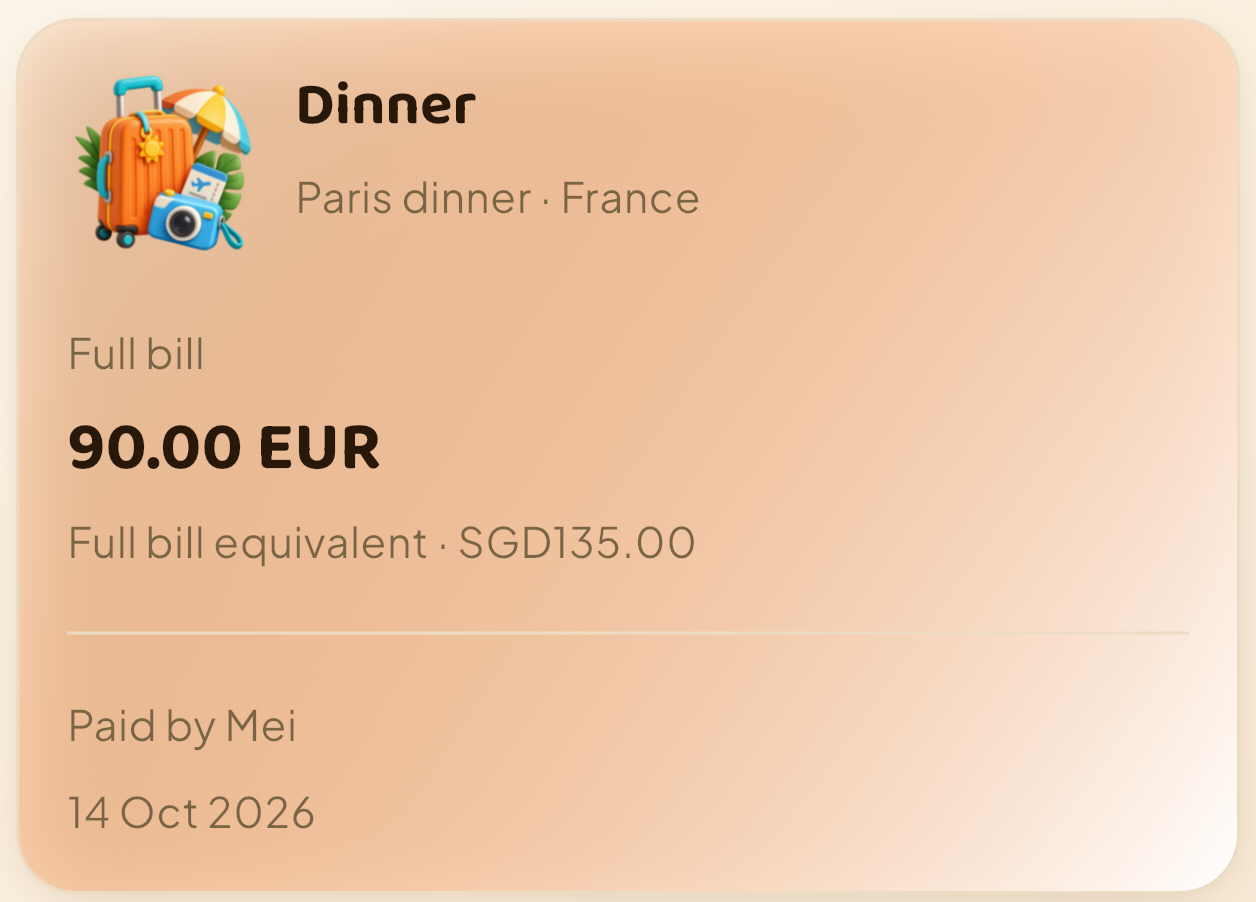
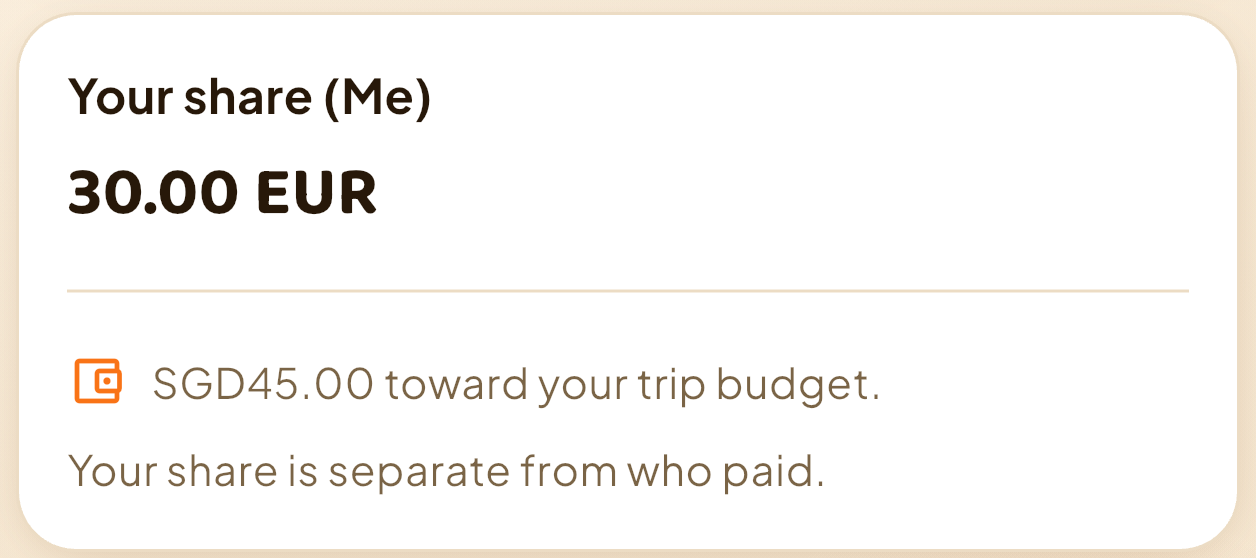
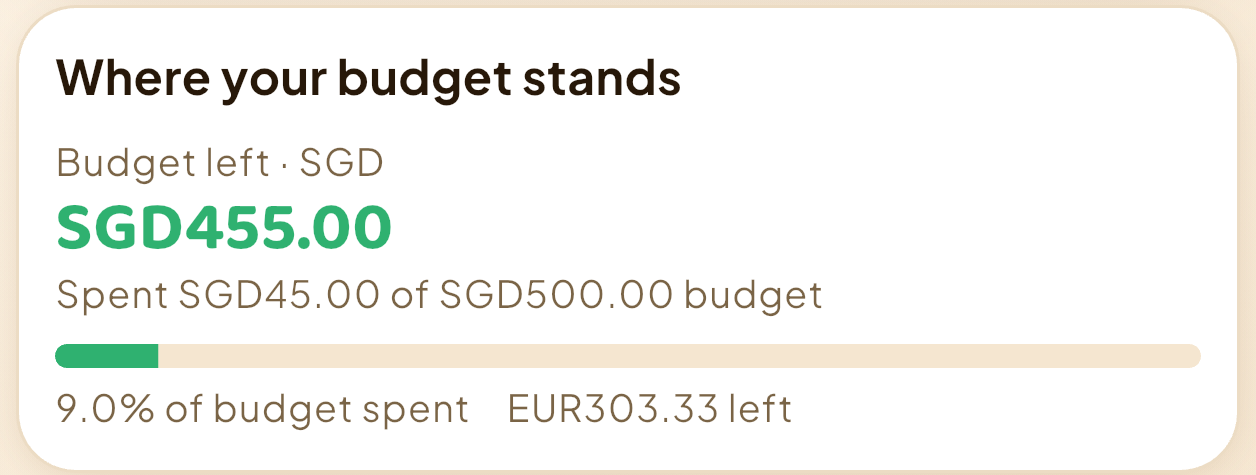
Illustrative saved example · actual iPhone captures. Nothing else was spent between the S$500 starting balance and the S$455 result.
The app displays the same rate the other way round: 1 SGD = 0.666667 EUR. That is the reciprocal of the example’s €1 = S$1.50.
You can see the difference in one saved expense: the group keeps its full bill, while Tom’s budget counts his share. Get HowMuchie to track your own share and budget, or see the full bill-to-budget demonstration.
Use the same five steps for each shared expense
- Record the full amount once. Keep the bill amount available for the group calculation.
- Choose the person who paid. Do not assume the payer is the only participant.
- Choose who shares the cost. A friend who skipped an activity need not receive an equal share of that bill.
- Agree on equal or custom amounts. Equal is convenient when everyone shares alike. Enter agreed custom amounts when that is a better fit.
- Check your personal share before saving. The number to compare with your remaining holiday budget is your allocated cost.
In HowMuchie, a local group belongs to a trip. Identify yourself as Me, choose the payer and included people, then review and save the split. You can also split an eligible expense you already recorded, rather than entering it a second time.
Do not count the meal again when you repay your friend
In the dinner example, Tom’s S$45 share already belongs in his trip spending. Repaying Mei later changes who holds the money; it does not create a second dinner. If you are keeping a separate personal record, avoid adding the same cost again as a new holiday purchase.
HowMuchie shows group balances and suggested repayments. It does not send money or record a payment. Use the suggestions to understand the balance, then handle the actual repayment separately.
It also helps to distinguish personal purchases from shared bills. A souvenir bought for yourself belongs entirely in your own budget. A taxi shared by three people needs the agreed shares. Applying the same treatment to both makes the totals harder to trust.
Same trip. Different budgets.
Track your own purchases, your share of group costs and what remains for you. Your friends can use HowMuchie on their own phones too, keeping their own spending and budgets in view.
A friend may organise the group’s bills, but your personal budget still needs your coffee, shopping and agreed shares. Confirm the shared amounts together, then record your own costs on your own phone.
Before your next shared expense, get HowMuchie and set up the trip you want to track.
For the organiser’s workflow, read how to split holiday costs when one person tracks the bills. For foreign-currency spending, see how to track a holiday using your own exchange rate.
Your next trip
Get HowMuchie
Track your share and what remains for your next meal, ride or activity.


iPhone availability varies by App Store region. Check your local store.
See available plans and current prices in the app. Purchase details are shown before you confirm.