
Group travel
Split holiday costs and keep your own budget clear
A friend can organise the group’s bills. The group total still doesn’t tell you what you have left to spend. Use HowMuchie to track your purchases, your agreed share of shared costs and what remains in your trip budget.
The short answer
Agree how shared costs will be divided, record each bill with its payer and included people, and confirm the shares while the expense is fresh. One person can organise the group’s bill record while every traveller uses HowMuchie for their own expenses, their share of shared costs and their personal trip budget.
Same trip. Different budgets. Keep your own spending in view.
Agree who is keeping the record
Dinner goes on one friend’s card. Someone else buys the train tickets. By the next day, the group needs more than a list of who paid: each person needs their agreed share. Use HowMuchie to keep the bill, payer and allocation together while your personal budget counts your own cost.
Agree which purchases are shared, who keeps the group’s bill record and how you will confirm the amounts. Check the shares while everyone remembers the meal, ride or activity. A short conversation then is easier than rebuilding the story from messages at the end of the trip.
Keeping the group’s bills organised is one job. Knowing what you can still spend is personal to each traveller. Whether you organise the bills or a friend does, use HowMuchie to track your own purchases and your agreed share of group costs against your own trip budget.
Record the bill while the details are easy to remember
“I paid for transport” is a difficult message to reconcile three days later. A useful record connects the amount to a specific expense and the people who shared it.
| Record | Why it helps |
|---|---|
| Full bill amount | Keeps the group’s cost clear. |
| Short description and date | Distinguishes one meal, ride or activity from another. |
| Who paid | Identifies who covered the bill. |
| Who shares it | Avoids charging somebody for an activity they skipped. |
| Agreed amounts | Makes equal or custom shares explicit. |
In HowMuchie, add people as names in the trip’s local group and identify yourself as Me. When splitting a bill, choose the payer and the included people separately. A payer can cover an expense for other people, so “who paid” should not decide the allocation automatically.
Save each expense once. If you already recorded an eligible travel expense, add its split to that record instead of creating another copy. This keeps the shared calculation connected to the expense you are already tracking.
Use equal shares when equal is what you agreed
Equal splits are useful for a taxi everyone took or a meal everyone agreed to share evenly. They are less useful when the group has agreed on different amounts.
For a simple hypothetical example, a €120 activity bill could be divided as €50, €40 and €30 if those are the amounts the three people agreed to cover. The custom amounts must still total €120. The app records that agreement; it does not decide what is fair for your friends.
HowMuchie supports equal and custom amounts. Choose the people included in each bill, review the allocation and save only when it matches the agreement. A custom split you are still editing is a draft, not another saved group bill.
You can keep the discussion brief: “Mei paid €90 for dinner. Are we splitting it three ways?” Confirming that at the table is easier than guessing which meal a vague message referred to later.
Keep who owes whom separate from your holiday budget
The group balance and your personal spending answer different questions. A balance helps explain who is owed money across the recorded bills. Your personal budget tracks the costs allocated to you.
If Mei pays a €90 dinner for three people, each equal share is €30. Tom’s own share still belongs in his budget even though he paid nothing at the restaurant. At €1 = S$1.50, that personal cost is S$45.
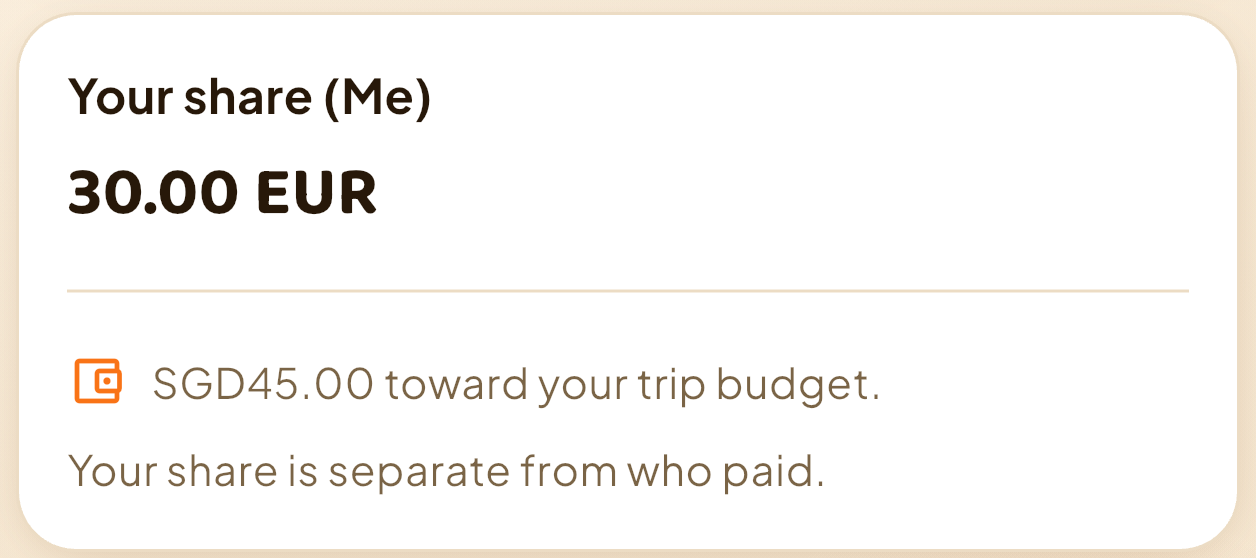
See the complete €90 dinner and personal-budget example, including the saved change from S$500 to S$455 remaining.
HowMuchie shows balances and suggested repayments based on the group’s recorded bills. It does not send money or record payments. Before anybody repays, check the recorded expenses and agreed shares together; handle the payment separately.
One group trip. A personal budget for every traveller.
The organiser can keep the group’s bills clear, and every friend can use HowMuchie to manage their own holiday spending. Track the coffee you bought yourself, your share of dinner and what remains in your own home-currency budget. Different budgets, shopping plans and spending priorities make that personal view useful throughout the same trip.
Confirm the shared amounts together, then record your own costs on your own phone. Keep each expense once in your personal record so your budget reflects your share accurately.
HowMuchie gives the organiser a place to check the bill, payer and shares, and gives each traveller a way to keep their own spending record. If you are the friend who paid nothing at dinner, your agreed dinner share still belongs in your budget. If you bought something just for yourself, that purchase belongs there too.
How do records work across different phones?
Each traveller keeps their own trip records on their own phone. Adding a friend’s name to your group does not send an invitation or sync a record to their device. Agree shared amounts together and enter them in your respective records. Device backups may include local records.
Get HowMuchie for your own trip budget. Start with the spending you want to track, then record your purchases and agreed shares as you go.
For foreign-currency costs, use the trip’s accepted rate consistently. The own-exchange-rate guide explains how a foreign price becomes a home-currency budget amount. Then see the local bill-to-budget workflow in HowMuchie.
Your next trip
Get HowMuchie
Same trip. Different budgets. Keep your own spending in view.


iPhone availability varies by App Store region. Check your local store.
See available plans and current prices in the app. Purchase details are shown before you confirm.